> ## Documentation Index
> Fetch the complete documentation index at: https://docs.exec.com/llms.txt
> Use this file to discover all available pages before exploring further.
# Interpret Your Results
> Understand your score and turn feedback into improvement
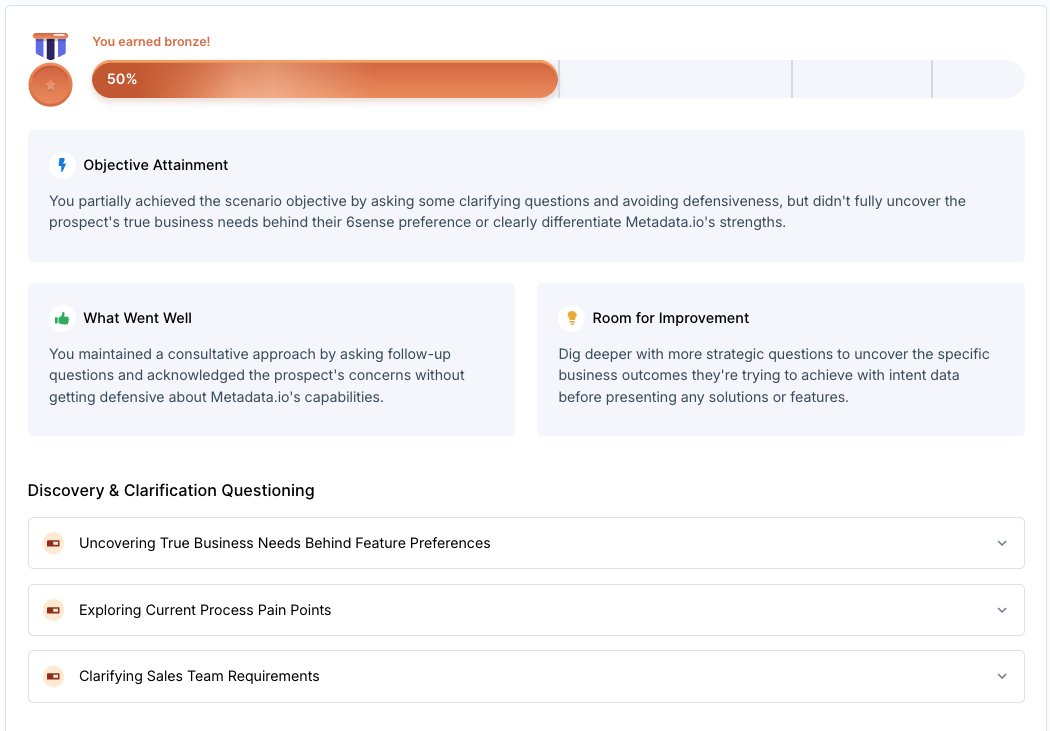
When you complete a roleplay and click **End**, Exec processes your performance and generates structured feedback based on a rubric that evaluates your conversation against observable skills and behaviors.
 ***
## Understanding Your Score
**Overall score and medal tier** — You'll receive a percentage score and a medal tier based on your performance: Bronze (50%+), Silver (75%+), or Gold (90%+).
**Executive summary** — A high-level overview of your strengths and the areas with the most room for improvement.
**Detailed rubric** — For each criterion, you'll see your performance summary, targeted tips, real examples from your conversation, and better alternatives you could have used. Your scores also feed into your long-term skill proficiency. See [Understand Your Skill Scores](/skills/understand-your-scores) to learn more.
Didn't score as high as you wanted? Pick 2–3 areas from the rubric to focus on and run the scenario again. That's how progress happens.
***
## How to Improve
Look at the rubric and pick 2–3 criteria to work on. Don't try to fix everything at once.
Listen to the audio or read the transcript to see exactly where things went well or off track.
Open the AI Coach at the bottom of your screen to rehearse improved approaches before your next attempt.
Run the scenario again with your new approach and watch how your scores shift over time.
***
## Tools Available on the Results Page
Click the bar at the bottom of your screen to ask questions like "What should I focus on?" or "How could I have handled that objection better?" [Learn more](/roleplays/ai-coach)
Review your full session to connect feedback to specific moments. Use the share button in the top right to send results to your manager or teammates.
***
## Getting Help
**Need help?** Contact us at [hello@exec.com](mailto:hello@exec.com) for any questions about your results or how scoring works.
***
## Understanding Your Score
**Overall score and medal tier** — You'll receive a percentage score and a medal tier based on your performance: Bronze (50%+), Silver (75%+), or Gold (90%+).
**Executive summary** — A high-level overview of your strengths and the areas with the most room for improvement.
**Detailed rubric** — For each criterion, you'll see your performance summary, targeted tips, real examples from your conversation, and better alternatives you could have used. Your scores also feed into your long-term skill proficiency. See [Understand Your Skill Scores](/skills/understand-your-scores) to learn more.
Didn't score as high as you wanted? Pick 2–3 areas from the rubric to focus on and run the scenario again. That's how progress happens.
***
## How to Improve
Look at the rubric and pick 2–3 criteria to work on. Don't try to fix everything at once.
Listen to the audio or read the transcript to see exactly where things went well or off track.
Open the AI Coach at the bottom of your screen to rehearse improved approaches before your next attempt.
Run the scenario again with your new approach and watch how your scores shift over time.
***
## Tools Available on the Results Page
Click the bar at the bottom of your screen to ask questions like "What should I focus on?" or "How could I have handled that objection better?" [Learn more](/roleplays/ai-coach)
Review your full session to connect feedback to specific moments. Use the share button in the top right to send results to your manager or teammates.
***
## Getting Help
**Need help?** Contact us at [hello@exec.com](mailto:hello@exec.com) for any questions about your results or how scoring works.